
AI for Vacation Rentals: Automate Guest Communication
The vacation rental boom in West Virginia
West Virginia’s tourism industry hit a record $9.1 billion in economic impact in 2025, drawing more than 77 million visitors statewide. The New River Gorge alone saw 270,000 visitors in October 2025 — up from 215,000 the year before. Demand for the state’s official 2026 vacation guide surged 460% over the previous edition, with nearly 81,000 preorders in just over a month.
For cabin and vacation rental owners across the region, that surge translates to more bookings, more revenue, and more guest messages at 11 PM asking for the Wi-Fi password.
If you manage one or two properties, you can handle the communication yourself. Once you hit three, four, or five cabins — each with different door codes, cleaning crews, and checkout rules — the inbox becomes a second job. Vacation rental AI solves that problem by handling the repetitive guest communication that eats your evenings, while you focus on growing your portfolio.
Common pain points for rental owners
Before diving into solutions, it helps to name the problems most owners recognize instantly.
Response time pressure
Airbnb’s algorithm rewards hosts who respond within one hour, and properties that hit that benchmark see 25% higher conversion rates. But guests don’t text during business hours. They message at midnight when they can’t find the lockbox, at 6 AM asking about checkout time, and at dinner when they want restaurant recommendations. If 75% of guest messages arrive outside normal hours, you’re either glued to your phone or losing bookings.
Double-booking and calendar chaos
Running listings on Airbnb, VRBO, and your own direct-booking site means syncing calendars across platforms. One missed sync and you’ve got two families arriving on the same Friday. The stress alone costs more than any software subscription.
Turnover coordination
The window between checkout and the next check-in is tight — often just a few hours. You need your cleaning crew confirmed, the property inspected, and the next guest’s arrival details sent. When you manage multiple properties on the same turnover day, one missed text to your cleaner cascades into a late check-in and a bad review.
Scaling without staff
Hiring a full-time property manager costs $3,000-$5,000 per month. Property management software like Guesty or Hospitable helps, but it still requires you to monitor dashboards, respond to flagged messages, and coordinate vendors manually. The gap between “software that organizes” and “something that actually does the work” is where most owners get stuck.
How AI handles guest communication
AI guest communication tools have evolved well past scripted chatbots. Modern vacation rental AI uses large language models that understand context, remember property-specific details, and respond in natural language that guests can’t distinguish from a human host.
Here is what that looks like in practice.
Instant answers to common questions
A guest texts: “What’s the door code for Hemlock Hideaway?” The AI responds in seconds with the correct code, plus a note about holding the lock button if the keypad light is red. It knows each property’s details because you’ve trained it once — door codes, Wi-Fi passwords, parking instructions, checkout time, trash day.
This alone eliminates the majority of guest messages. Most hosts find that 70-80% of incoming texts are variations of the same ten questions. AI handles all of them instantly, 24 hours a day.
Local recommendations that feel personal
Guests ask where to eat. Instead of a generic Yelp link, the AI recommends your curated list of local restaurants, hiking trails, and activities. A cabin near the New River Gorge gets recommendations for Pies & Pints and whitewater outfitters. A lakeside property gets marina info and fishing spots. The recommendations are yours — the AI just delivers them at the right moment.
Escalation for real issues
Not everything can be handled by AI. A water leak, a power outage, or a safety concern gets flagged and escalated to you immediately with a priority alert. The AI handles the routine so that when your phone buzzes, you know it actually matters.
Setting up automated booking management
Getting started with vacation rental AI doesn’t require a technical background. The setup process follows a straightforward pattern.
Step 1: Add your property details
For each property, you provide the basics: name, address, door codes, Wi-Fi password, check-in time, checkout time, parking instructions, and house rules. This is the same information you’d give a new property manager on their first day.
Step 2: Set up your vendor contacts
Add your cleaning crew, handyman, and any other vendors. The AI needs to know who to text when a turnover is coming or when a guest reports a maintenance issue.
Step 3: Customize your local guide
Add your favorite restaurants, activities, and hidden gems for each property’s area. This is what makes the AI feel like a knowledgeable local host rather than a generic assistant.
Step 4: Connect and go live
Once your properties are loaded, the AI starts handling guest messages immediately. It learns over time — picking up on the questions your guests ask most frequently and improving its responses based on the patterns it sees.
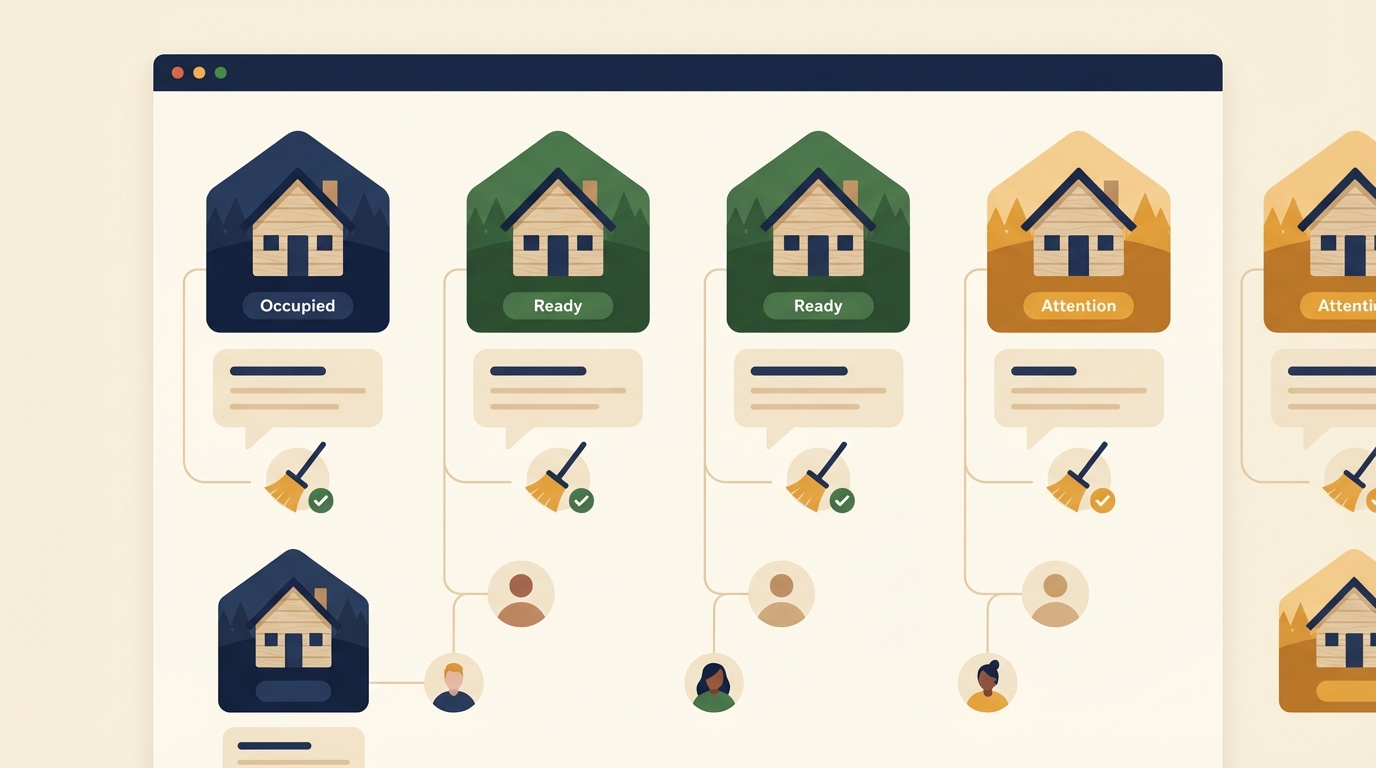
Cleaning crew coordination with AI dispatch
Turnover day is where vacation rental management gets stressful. AI dispatch eliminates the back-and-forth by automating the entire coordination chain.
Here is the typical flow:
- Checkout detected — The AI knows checkout time from your calendar. It sends a message to your cleaner with the property address, next check-in time, and any special notes (“guests had a dog, extra vacuum needed”).
- Cleaner confirms — Your cleaning crew replies confirming they’re on the way or flags a scheduling conflict. If there’s a conflict, the AI alerts you.
- Completion check — The cleaner texts when done. The AI logs the completion time and marks the property as ready.
- Guest notification — The next guest gets a pre-arrival message with directions, check-in instructions, and a note that their cabin is freshly prepared.
This sequence runs automatically for every turnover across every property. No phone calls, no group texts, no spreadsheets. If you also use Dispatch AI for field service coordination in another business, the workflow pattern is identical — receive a trigger, coordinate the crew, confirm completion, notify the next person in line.
What to expect in the first 30 days
| Week | What happens |
|---|---|
| Week 1 | AI handles check-in instructions, door codes, Wi-Fi, and basic FAQs. You monitor responses to build confidence. |
| Week 2 | Local recommendations and house rules are dialed in. Guest response time drops to under 2 minutes. |
| Week 3 | Turnover coordination is running smoothly. Cleaning crew gets comfortable with the automated text flow. |
| Week 4 | You check your phone out of habit, not necessity. The AI has handled hundreds of messages you didn’t have to read. |
Most owners report saving 5-10 hours per week once the system is fully dialed in. That’s time you can spend acquiring new properties, improving existing ones, or simply not working on a Saturday night.
Cost comparison
| Option | Monthly cost | What it covers |
|---|---|---|
| Full-time property manager | $3,000-$5,000 | Everything, but expensive |
| Property management software | $20-$100/property | Organization, but you still do the work |
| AI guest communication | $99-$149/mo | Guest messages, turnover dispatch, local recs, 24/7 |
| Doing it yourself | $0 | Free, until you count the hours |
The math works out quickly. If your average nightly rate is $200 and faster response time converts even one additional booking per month, the AI pays for itself before you factor in the time savings.
AirDNA says 2026 is the year to invest
According to AirDNA’s 2026 Outlook Report, this is the strongest investment environment for short-term rentals since 2021. Supply growth has slowed to a projected 4.6% — well below the 20% peak in 2021-2022 — while demand is stabilizing and the STR premium (earnings relative to investment costs) has climbed to its highest level since 2022.
Mountain and lake destinations, which describes most of West Virginia’s rental market, are among the top-performing property types. Owners who use dynamic pricing tools earn 10.7% more in RevPAR (revenue per available rental) compared to those who don’t.
The takeaway: the market conditions favor owners who can operate efficiently. AI tools aren’t a luxury for multi-property empires — they’re what lets a two-cabin owner in Fayetteville compete with professional management companies in Gatlinburg.
Making it work for Appalachian rentals
West Virginia cabins aren’t beachfront condos in Miami. The guests are different, the properties are different, and the local knowledge matters more. A generic property management tool doesn’t know that Gauley Season brings a specific type of guest, that the road to your cabin might need winter driving instructions, or that the nearest grocery store closes at 9 PM.
Cabin Fever was built for exactly this context — short-term rental owners in cabin country who need an AI agent that understands the region. It handles guest auto-reply, turnover coordination, maintenance tracking, local recommendations, pricing alerts, and weekly property summaries. All through text.
If you’ve been handling guest messages yourself and feeling the strain, or if you’ve been using software that organizes information but doesn’t actually do the work, AI guest communication is the upgrade that changes your daily routine. Your guests get faster responses, your cleaners get clearer instructions, and you get your evenings back.
The tourism numbers in West Virginia aren’t slowing down. The question isn’t whether to automate — it’s how soon you start. See how Cabin Fever works for your rental business.