
AI Intake Widgets: What They Are and Why They Work
Your contact form is losing you customers
Here is a number that should make every small business owner uncomfortable: 81% of people who start filling out an online form abandon it before hitting submit. That is according to research from The Manifest, and it aligns with what we see across service businesses in the Appalachian region every day.
Your website has a contact form. Someone finds you on Google, clicks through, starts typing their name and email — and then stops. Maybe the form asked for a phone number they did not want to share. Maybe they got distracted. Maybe they just did not feel like filling out seven fields to ask a simple question. Whatever the reason, they leave. And research from Harvard Business Review shows that if you do not respond to a lead within five minutes, your odds of qualifying that lead drop by 400%.
An AI intake widget solves both problems at once. Instead of presenting visitors with a static form and hoping they fill it out, it starts a conversation. It asks one question at a time. It adapts based on answers. And it responds instantly — at 2 AM on a Sunday or during a lunch rush on a Tuesday.
Contact forms are broken for service businesses
The traditional contact form was designed for a different era of the internet. Back when simply having a website was a competitive advantage, a name-email-message form was enough. Visitors were patient. Competition was low. Response times measured in days were acceptable.
None of that is true anymore.
The abandonment problem
The numbers tell a clear story. According to Feathery’s analysis of online form statistics, only 38% of users who interact with a contact form actually submit it. The view-to-completion rate is even worse — just 9% of all visitors who see a contact form end up completing it.
The reasons are predictable. Security concerns drive 29% of abandonments. Form length accounts for another 27%. And on mobile devices — where over 60% of web traffic now comes from — the conversion rate drops to just 12.7% compared to 17.5% on desktop.
For a plumber in Beckley or a vacation rental manager in Davis, this is not an abstract marketing problem. Every abandoned form is a customer who needed help and did not get it.
The response time gap
Even when someone does submit a form, the clock starts ticking immediately. The Harvard Business Review study on lead response times found that businesses responding within five minutes are 21 times more likely to qualify the lead than those responding within 30 minutes. After an hour, the odds drop sevenfold.
But most small businesses cannot monitor form submissions around the clock. A contractor on a job site is not checking email. A restaurant owner during dinner service is not refreshing their inbox. The average response time for web form submissions is over 42 hours — by which point 78% of buyers have already gone with whoever responded first.
What an AI intake widget does differently
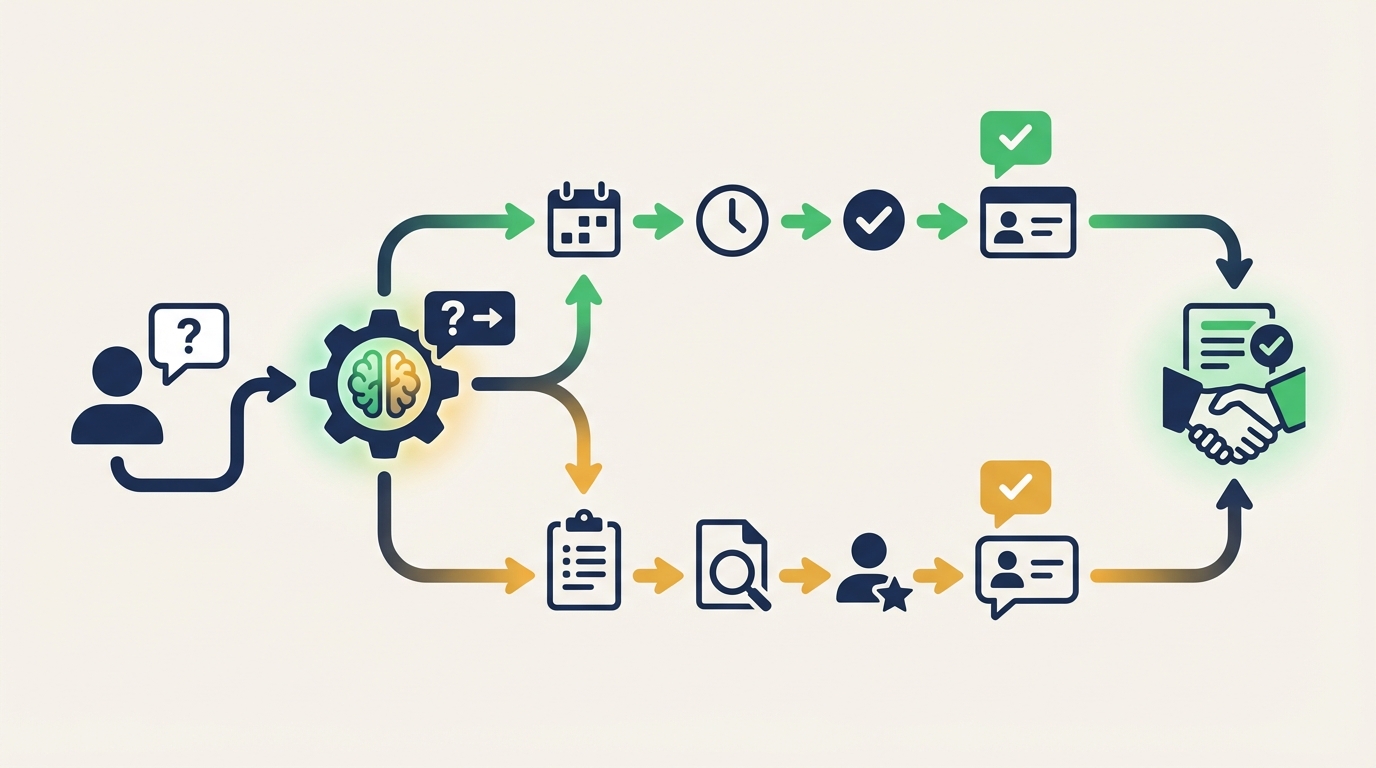
An AI intake widget replaces the static form with an intelligent conversation. Instead of dumping a list of fields on the visitor, it engages them the way a good receptionist would — one question at a time, adapting based on their answers.
Conversational flow instead of form fields
When a visitor lands on your site, the widget greets them and asks what they need help with. If they say “I need my furnace looked at,” the widget does not ask them to fill out a generic form. It asks relevant follow-up questions: What type of furnace? When did the problem start? What is their zip code? Can they describe what is happening?
Each answer shapes the next question. A visitor describing an emergency gets fast-tracked. Someone asking about routine maintenance gets different questions than someone reporting a breakdown. The conversation feels natural because it follows the logic a human receptionist would use.
This approach works. Research from Glassix found that websites using AI chatbots saw a 23% increase in conversion rates compared to those without. And industry data shows that chatbot-based intake can convert up to 28% of website visitors into qualified leads — compared to that 9% form completion rate.
Instant response, every time
The widget responds in seconds, not hours. Whether a visitor arrives at noon or midnight, they get the same quality interaction. This matters because customer inquiries do not follow business hours — a burst pipe, a broken AC unit, or a guest checking in to a cabin rental can happen at any time.
The speed-to-lead research is unambiguous: responding within five minutes makes you 100 times more likely to reach the lead than waiting 30 minutes. An AI intake widget guarantees that response time for every single visitor.
Qualification and data capture
A good AI intake widget does more than collect contact information. It qualifies leads by asking the right questions, routes inquiries to the right person or department, and captures structured data that goes directly into your workflow.
When a homeowner in Huntington tells the widget their hot water heater is leaking, the widget can:
- Determine if it is an emergency or a routine service call
- Collect the property address and contact information
- Check availability and suggest appointment times
- Send an immediate confirmation to both the customer and the business owner
- Log the interaction with all details in the business’s CRM or scheduling system
No form in the world does all of that. And no human receptionist does it at 11 PM on a Saturday.
AI intake vs chatbots vs live chat
These three terms get used interchangeably, but they are different tools with different strengths. Understanding the differences helps you choose the right solution.
| Feature | Static contact form | Basic chatbot | Live chat | AI intake widget |
|---|---|---|---|---|
| Available | 24/7 | 24/7 | Business hours | 24/7 |
| Response time | Hours to days | Instant | Minutes | Instant |
| Adapts to context | No | Limited | Yes | Yes |
| Qualifies leads | No | Basic | Yes | Yes |
| Handles complex questions | No | No | Yes | Yes |
| Cost per month | Free | $0-50 | $500-2,000+ | $50-200 |
| Scales without hiring | Yes | Yes | No | Yes |
Basic chatbots fall short
Traditional rule-based chatbots follow scripted decision trees. They work fine for simple FAQs — “What are your hours?” or “Where are you located?” — but they fall apart when conversations go off-script. A visitor asking “My AC is making a weird grinding noise and it smells like burning” will get a generic “I’m sorry, I didn’t understand that” from most basic chatbots.
AI intake widgets use large language models to understand natural language. They can handle unexpected questions, follow conversational tangents, and still guide the visitor toward the information the business needs to follow up.
Live chat is expensive to scale
Live chat works well — when someone is available to respond. But staffing a live chat during all business hours requires dedicated employees, and extending coverage to evenings and weekends means hiring even more. For a small business with three to five employees, that is not realistic.
The math is straightforward. A live chat service costs $500 to $2,000 per month depending on coverage hours and volume. An AI intake widget handles unlimited conversations for a flat monthly fee, typically between $50 and $200.
The hybrid approach
The best setup combines AI intake with human escalation. The AI widget handles the initial conversation, qualifies the lead, and collects key information. If the visitor needs something the AI cannot resolve — a complex technical question, a pricing negotiation, a complaint — it hands off to a human with full context of the conversation so far.
This is exactly how Hollr works. The AI handles 80-90% of initial interactions automatically, escalating only the conversations that genuinely need human attention.
How to choose the right intake solution
Not every business needs the same level of AI intake. Here is how to think about what fits your situation.
Start with your biggest bottleneck
If you are a solo contractor who misses calls because you are on job sites all day, the priority is capturing those leads before they call your competitor. An AI intake widget that collects contact information and service details is the minimum viable solution.
If you run a multi-location service business with a front desk team, the widget augments your staff by handling after-hours inquiries and overflow during busy periods.
If you manage vacation rentals across multiple properties, you need something that can answer property-specific questions, check availability, and handle booking inquiries — a more sophisticated setup that integrates with your property management system.
Questions to ask before choosing
- What percentage of inquiries come outside business hours? If the answer is more than 20%, an AI intake widget pays for itself quickly.
- How many leads do you lose to slow response times? If you are not sure, that is the answer — you are losing more than you think.
- What information do you need from a lead before you can follow up? Map this out. The widget should collect exactly this data.
- Do your inquiries require nuanced understanding? If visitors describe complex problems in their own words, you need AI-powered natural language understanding, not a scripted chatbot.
Integration matters
An AI intake widget is only as useful as its connection to your existing workflow. If it collects leads but drops them into an email inbox you check twice a day, you have not actually solved the response time problem.
Look for solutions that integrate with your calendar, CRM, or dispatch system. The information the widget captures should flow directly into whatever tool your team already uses to manage jobs and appointments.
For service businesses in the trades, this is where AI employees like Dispatch add another layer — taking the qualified lead from the intake widget and automatically scheduling it based on technician availability and location.
What real results look like
The data on AI intake widgets is consistent across industries and business sizes.
Businesses using conversational AI for intake typically see:
- 2-3x more qualified leads from the same website traffic, according to Drift’s research on conversational marketing
- Response times under 30 seconds versus hours or days with traditional forms
- 80-90% of routine inquiries handled automatically, freeing staff to focus on revenue-generating work
- Higher customer satisfaction scores — 80% of people who interact with AI chatbots report a positive experience
For a concrete example: a three-person HVAC company that previously missed 60% of after-hours calls can capture those leads automatically, qualify them by urgency, and have appointments scheduled before the owner even checks the system in the morning. At an average job value of $200-500, converting even five additional leads per week translates to $4,000-10,000 in monthly revenue that was previously walking out the door.
This is the same math we explored in our post on why every small business needs an AI answering service — the cost of inaction far exceeds the cost of the tool.
Getting started
Implementing an AI intake widget does not require a website redesign or a technology overhaul. Most solutions, including Hollr, can be added to an existing website with a single line of code — similar to adding Google Analytics.
The setup process typically takes 15-30 minutes:
- Define your intake flow — what questions do you need answered before you can follow up?
- Configure the widget — set your business hours, greeting message, and escalation rules
- Add it to your site — paste the embed code into your website template
- Test with real scenarios — run through the conversations your customers typically have
- Connect your tools — link the widget to your calendar, CRM, or email
The key is to start simple. You do not need to build a perfect conversational flow on day one. Start with the basics — capture name, contact information, and service needed — and refine based on real conversations over the first two weeks.
If you are ready to stop losing leads to static forms and slow response times, see how Hollr works for service businesses across Appalachia. It handles the conversation so you can focus on the work.