
Voice AI for Business: The End of Hold Music
Nobody likes being put on hold
Sixty-seven percent of callers hang up on an IVR system out of sheer frustration. That is not an obscure stat buried in a whitepaper — it is an American Express customer service survey finding that confirms what every business owner already suspects: your phone system is driving customers away.
Think about what happens when someone calls a typical small business. They hear a robotic greeting. They press 1, then 3, then 0. They wait. They listen to a loop of hold music they did not ask for. By the time a human picks up — if one picks up at all — they are already irritated.
Voice AI replaces that entire experience with a conversation. No menus. No hold music. No “press 1 for sales.” The caller speaks naturally, the AI understands what they need, and it either handles the request or connects them to the right person. For small businesses that cannot afford a full-time receptionist, voice AI is not a luxury — it is the most practical way to stop losing callers.
The business phone system problem
The traditional business phone system was built for a world with dedicated receptionists, switchboard operators, and customers who expected to wait. That world is gone.
Customers will not wait
According to HubSpot research, 33% of consumers say waiting on hold is the most frustrating part of customer service. Another 33% say repeating information to multiple representatives is equally maddening. The industry benchmark for call centers is answering 80% of calls within 20 seconds — a standard that virtually no small business meets.
The stakes are higher than annoyance. McKinsey research found that 75% of callers try to bypass IVR systems entirely, mashing buttons or shouting “representative” until they reach a person. And 40% of customers stop doing business with a company after a single bad IVR experience.
Small businesses bear the worst of it
A 50-person call center can absorb hold times and route callers through sophisticated queue management. A three-person HVAC company in Beckley cannot. When the owner is crawling under a house and the technician is on a service call, the phone goes to voicemail. And as we covered in our guide to AI answering services, small businesses miss over 60% of incoming calls — losing an estimated $126,000 per year to unanswered phones.
The problem is not that small business owners do not care about their callers. The problem is that legacy phone systems force them to choose between doing their work and answering the phone.
IVR made it worse, not better
Interactive Voice Response systems were supposed to solve this. Route callers automatically. Provide self-service options. Reduce hold times. In practice, they created a new problem: 61% of customers say IVR systems contribute to a poor experience. The rigid menu trees, poor voice recognition, and impersonal feel of traditional IVR turned a waiting problem into a frustration problem.
Voice AI is fundamentally different from IVR. Where IVR forces callers into predefined paths, voice AI lets them speak naturally and responds accordingly.
How voice AI works
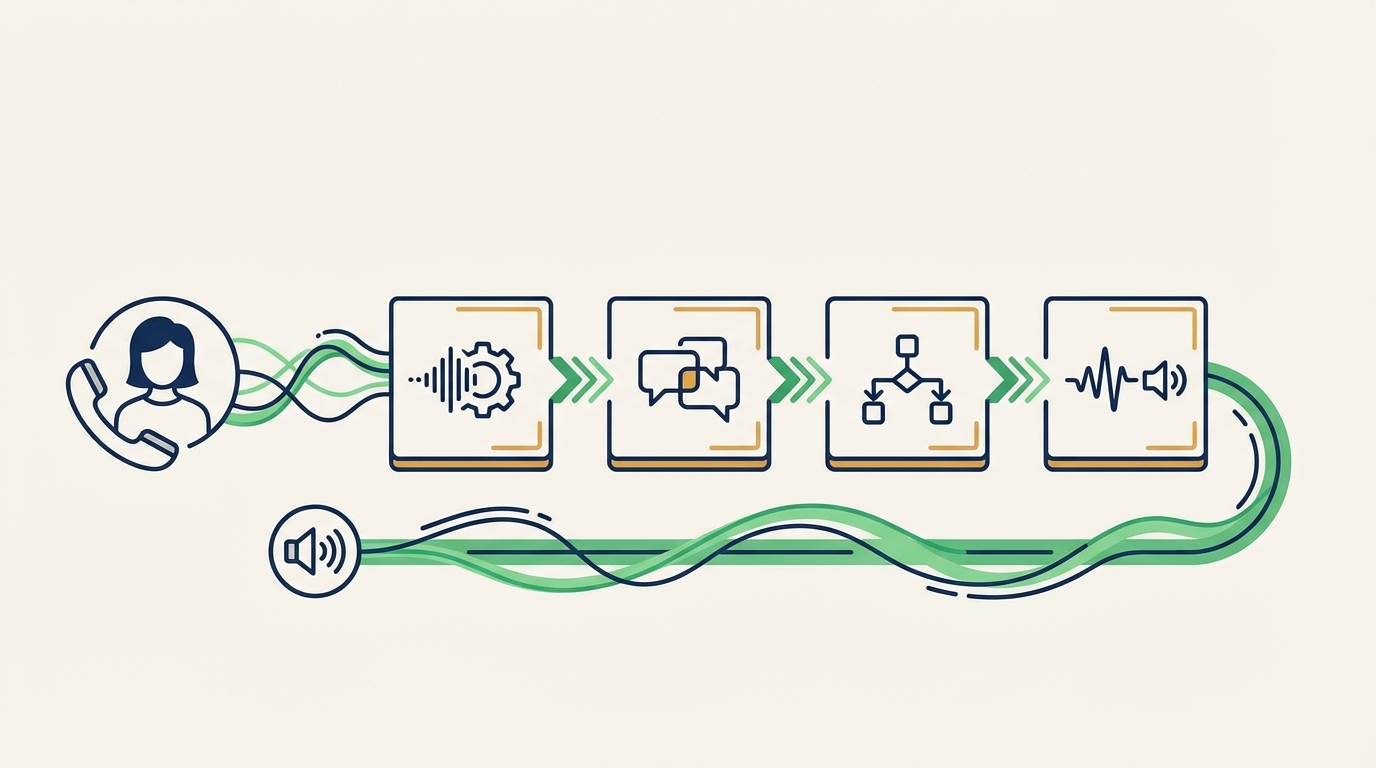
Voice AI is not a single technology. It is a pipeline of specialized systems working together in real time — typically completing the entire loop in under a second.
Speech recognition (ASR)
The first step is automatic speech recognition. When a caller speaks, the AI converts their voice into text. Modern ASR systems built on transformer architectures achieve over 95% accuracy on clean audio, with significant improvements in noisy environments. Word error rates in challenging conditions have dropped by 57 to 73% over the past five years, making real-world phone conversations reliably transcribable.
The system handles accents, background noise, and natural speech patterns — including the “ums,” pauses, and half-sentences that real callers produce.
Natural language understanding (NLU)
Transcribing words is only half the job. The AI also needs to understand what those words mean. Natural language understanding extracts the caller’s intent and key details from the transcribed text.
When a caller says “I need someone to come look at my furnace — it’s been making a weird banging noise since yesterday,” the NLU layer identifies:
- Intent: Schedule a service call
- Service type: Furnace repair
- Symptom: Unusual banging noise
- Urgency: Ongoing since yesterday (not an emergency, but time-sensitive)
This is where voice AI diverges from old IVR systems. IVR listens for specific keywords or menu selections. NLU understands context, synonyms, and implied meaning.
Dialog management
A dialog manager maintains the flow of the conversation. It tracks what has been said, determines what information is still needed, and decides the next question or action. If the caller mentioned the furnace problem but has not given their address yet, the dialog manager prompts for it naturally: “I can get a technician out to take a look. What’s the address?”
Speech synthesis (TTS)
The final step is text-to-speech synthesis. The AI generates a spoken response using a natural-sounding voice. Modern TTS systems like those from Google Cloud offer hundreds of voice options across dozens of languages, with intonation and pacing that sound conversational rather than robotic.
The entire ASR-NLU-dialog-TTS loop happens in real time. The caller experiences it as a normal conversation — not a series of mechanical prompts.
Voice AI vs IVR vs live operators
Each approach to handling business phone calls has real trade-offs. Here is how they compare on the metrics that matter.
| Feature | Traditional IVR | Live operator | Voice AI |
|---|---|---|---|
| Availability | 24/7 | Business hours (or expensive night shifts) | 24/7 |
| Response time | Instant menu, slow resolution | 1-5 minute wait, fast resolution | Instant, fast resolution |
| Simultaneous calls | Unlimited (menu only) | 1 per operator | Unlimited |
| Customer satisfaction | Low (61% say poor experience) | High (when staffed) | High (30% improvement over IVR) |
| Handles complex requests | No — rigid menu trees | Yes — human judgment | Improving — handles most routine requests |
| Monthly cost (SMB) | $50-300 | $2,500-5,000+ | $50-350 |
| Setup complexity | Moderate | High (hiring, training) | Low to moderate |
Where each option fits
Traditional IVR still has a place for very large call centers with dedicated routing teams. For small businesses, it creates more friction than it solves.
Live operators are irreplaceable for emotionally complex conversations — a personal injury intake call, a bereavement service, a high-value sales negotiation. If empathy is the core requirement, a human voice still wins.
Voice AI handles the vast majority of small business calls: scheduling, intake, FAQs, basic troubleshooting, and call routing. These are transactional conversations where speed, accuracy, and availability matter more than emotional nuance. For the HVAC company fielding “my AC is broken” calls or the auto shop hearing “I need an oil change Thursday,” voice AI handles these flawlessly and affordably.
The best setups combine voice AI for routine calls with human escalation for the exceptions. The AI handles 80% of volume automatically and routes the 20% that need a person.
Use cases that work today
Voice AI is not a future technology waiting for one more breakthrough. Businesses are using it now, and the use cases map directly to the daily operations of small service companies.
Intake and lead qualification
This is the highest-value use case for most businesses. The AI answers every call, asks qualifying questions (what service, what location, how urgent), and delivers a structured lead to your CRM or phone. No more deciphering voicemail messages. No more losing callers who hang up after four rings.
If you are already using an AI intake widget on your website, voice AI extends the same capability to your phone line. Callers who prefer calling over chatting get the same quality experience.
Appointment scheduling
The AI checks your calendar in real time, offers available slots, books the appointment, and sends confirmation to both parties. It handles rescheduling and cancellations the same way. For service businesses where scheduling is the primary phone interaction, this alone justifies the investment.
We covered the scheduling angle in depth in our AI appointment scheduling guide — voice AI is the phone-based version of the same workflow.
FAQ handling
“What are your hours?” “Do you service my area?” “How much does a tune-up cost?” These questions repeat dozens of times a week. Voice AI answers them instantly and consistently, freeing you for revenue-generating work. Unlike IVR, the caller does not have to navigate a menu to get a simple answer — they just ask.
Intelligent call routing
When a call does need a human, voice AI can route it intelligently. Instead of “press 1 for sales, press 2 for support,” the caller describes their issue and the AI routes to the right person based on content, not button presses. Emergency calls get flagged and fast-tracked. Routine follow-ups go to the scheduling queue.
Outbound follow-ups
Voice AI is not limited to inbound calls. Some businesses use it for appointment reminders, follow-up surveys, and review requests. A voice call asking “How was your service yesterday?” with a simple “great” or “not great” response path generates feedback that texts and emails cannot match.
Setting up voice AI for your business
Getting started with voice AI is simpler than most business owners expect. You do not need to replace your phone system or hire a consultant.
Step 1: Map your call flows
Before configuring anything, document the five to ten most common reasons people call your business. For most service companies, this list looks like:
- Schedule a new appointment
- Ask about pricing
- Check on an existing job
- Report an emergency
- Ask about service area or hours
Each of these becomes a conversation path the AI handles.
Step 2: Choose your platform
Voice AI platforms range from enterprise solutions to small-business-friendly tools. For a local service company, look for:
- Simple setup — visual conversation builder, not custom code
- Phone number integration — forwards from your existing number
- Calendar sync — connects to Google Calendar, ServiceTitan, or your scheduling tool
- CRM delivery — sends qualified leads to your inbox, app, or CRM
Appalach.AI’s AI Employees are built specifically for this — industry-specific voice and chat AI that understands the language of your trade.
Step 3: Configure and train
Give the AI your business details: name, services, hours, service area, pricing guidelines, and any special instructions. The more context you provide, the more natural conversations sound. Most platforms let you test by calling your own number and running through scenarios before going live.
Step 4: Set escalation rules
Decide which calls the AI handles completely and which get transferred to a human. A good starting rule: let the AI handle scheduling, FAQs, and basic intake. Escalate anything flagged as an emergency, a complaint, or a request the AI cannot parse.
Step 5: Monitor and refine
Review call transcripts weekly for the first month. Look for places where the AI misunderstood a caller, gave an incomplete answer, or missed an escalation trigger. Adjust the conversation flows and context accordingly. Most businesses see significant improvement after two to three weeks of tuning.
Cost comparison and ROI
The economics of voice AI favor small businesses more than any previous phone technology.
What voice AI costs
Pricing varies by platform, but small business plans typically fall into predictable ranges:
| Pricing model | Typical cost | Best for |
|---|---|---|
| Flat monthly subscription | $50-350/month | Businesses with steady call volume |
| Per-minute pricing | $0.07-0.50/minute | Businesses with variable or low volume |
| Per-call pricing | $0.50-2.00/call | High-volume, short-call businesses |
Source: CloudTalk 2026 pricing analysis and Retell AI cost breakdown.
Compare that to alternatives:
- Live receptionist: $35,000-50,000/year salary, plus benefits
- Live answering service: $245-1,380/month for limited minutes, $2,390/month for 400 calls
- Doing nothing: An estimated $126,000/year in missed revenue
A voice AI system at $200/month costs $2,400/year. Even if it captures just two additional jobs per month at $350 each, that is $8,400 in recovered revenue against $2,400 in cost — a 3.5x return before accounting for time saved.
ROI timeline
According to Forrester’s analysis of AI implementations, most businesses see positive ROI within three to eight months. Cost savings appear immediately as the AI absorbs call volume. Revenue gains build over the first quarter as more leads convert.
The longer-term numbers are even more compelling. McKinsey research shows that companies using AI-driven customer engagement reduce operational costs by up to 40% while improving satisfaction by 25% or more. IBM documented a 30% rise in customer satisfaction and a 50% reduction in queue times after voice AI implementation.
The math for a typical service business
Here is what the numbers look like for a home services company fielding 20 calls per day:
| Metric | Without voice AI | With voice AI |
|---|---|---|
| Calls answered | 8 of 20 (40%) | 20 of 20 (100%) |
| Leads captured | 5/day | 14/day |
| Appointments booked | 3/day | 10/day |
| Monthly revenue from phone leads | $18,900 | $63,000 |
| Monthly cost of phone handling | $0 (voicemail) | $200 |
The gap between “answering 40% of calls” and “answering all of them” is not a marginal improvement. It is a fundamentally different business.
The bottom line
Voice AI is not about replacing humans. It is about making sure every caller reaches your business — whether you are on a job site, eating dinner, or sleeping. Traditional IVR frustrated customers with rigid menus and hold music. Live operators work but do not scale on a small business budget. Voice AI threads the needle: natural conversations, 24/7 availability, and a cost that makes sense for a business with three employees and thin margins.
The technology is ready. Speech recognition accuracy has crossed the 95% threshold for clean audio. Natural language understanding handles the nuance of real conversations. And pricing has dropped to where a $200/month investment can recover thousands in otherwise-lost revenue.
If your business depends on phone calls — and in Appalachia, most do — voice AI is worth a serious look. See how Hollr works for your industry, or explore our AI Employees to find the right fit for your business.